Leagues with friends
Create a private league, invite your friends with an invite code and compare Round after Round – in the unofficial fantasy game for the Swiss Super League.
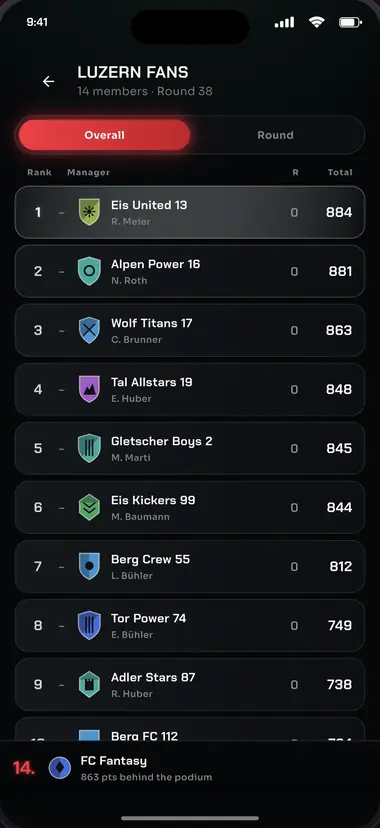
What a private league is
A private league is a table of your own, for you and the people you invite: the office, the team, the family, the pub. It is not a second game to keep on top of — it counts exactly the points you are already scoring Round after Round with your squad, and simply ranks you against each other. Nothing extra to pick, nothing extra to administer.
Two more leagues run automatically as soon as your squad is complete: an overall table, and a table for the club you picked as yours at the start. Those two cannot be left and cannot be deleted. Everything else is a private league — and those exist only because somebody created one and passed an invite code around.
There is no cap on how many private leagues you play in, and no cap on how many members a league can have. A league of three works exactly like a league with the whole club in it.
Creating a league
- Your squad first. Leagues need a finished team — both to create one and to join one. Until your squad is complete, the app will say so.
- Under “Leagues”, tap “Create league”. Give it a name of 3 to 40 characters. Give that a moment's thought: the name cannot be changed afterwards.
- Share the code. Your league is given its invite code straight away. You are a member and the admin automatically — all that's missing is everyone else.
How the invite code works
The invite code is normally eight characters long: capital letters and digits. Look-alike characters are left out on purpose — no capital O next to zero, no capital I next to one. That means the code survives being read out over the phone, retyped, or scribbled on a beer mat. Every code belongs to exactly one league.
Upper case or lower case makes no difference when you type it in — the code works either way.
Inviting someone takes nothing more than that code: drop it into the group chat and you're done. Anyone who is already a member cannot join a second time with the same code.
Joining a league
- Get the code. Every member can see the invite code on the league screen and pass it on.
- Under “Leagues”, tap “Join league”. Type the code in and confirm. If no league matches it, the app tells you immediately.
- You're in the table. The points you have already scored this season come with you — you don't start from zero, you come in exactly where you stand.
How the table is worked out
The table runs over the whole season: whoever has scored the most points is top. What goes into it is exactly what your total points show — including the points hit for extra transfers, and including the Rounds in which you played a Boost. Alongside the overall table, it can also be switched to a single Round, for when you want to know who picked best this weekend.
While a Round is in play the table keeps up live: you can watch the ranks move as the matches run. Bonus points and auto-subs in it are still provisional.
Managers on the same points share the same rank. Four members on 100, 90, 90 and 80 points therefore take ranks 1, 2, 2 and 4 — not 1, 2, 3, 4. Within a shared rank, whoever has been playing longest is listed first. How the points themselves are awarded is set out in the rules.
Joining mid-season
A private league can be started at any point in the season — in November, or with only a handful of Rounds to go. Anyone who joins brings their season total with them, so the table means something immediately and nobody has to backfill anything.
Starting the game itself mid-season is a different matter: you score from your own first Round onwards. Nothing is credited retrospectively for the Rounds before that — nobody is given points for decisions they never had to make. Against members who have been playing longer you therefore begin some way back in the overall table. That is exactly what the per-Round table is for: there, only the current weekend counts, and it can just as easily be won by someone who joined a fortnight ago.
Running a league
- The admin is whoever created the league. Only they can delete it — and if they do, it disappears for every member.
- Leaving a private league is possible at any time, for any member. Your points are untouched by it; they carry on counting in all your other leagues.
- If the admin deletes their account, the member who has been in the league longest takes over. If nobody is left, the league is dissolved.
- Renaming a league isn't possible. The name chosen at creation is the one it keeps.
What next?
Once the league is set up, it all comes down to what is decided every Round: who you pick, who wears the captain's armband, when you spend your Boosts, and which transfers are worth −4 points to you. The full rules explain every points award in detail; the short answers are in the frequently asked questions.